novelibre ${Home page} > xxx pages > ${Online help} > nv_updater
nv_updater
User guide
This page refers to the latest nv_updater release. You can open it with ${Help} > ${Update checker Online help}.
The plugin adds a ${Check for updates} entry to the novelibre ${Tools} menu, and an ${Update checker Online help} entry to the ${Help} menu.
Start the update checker
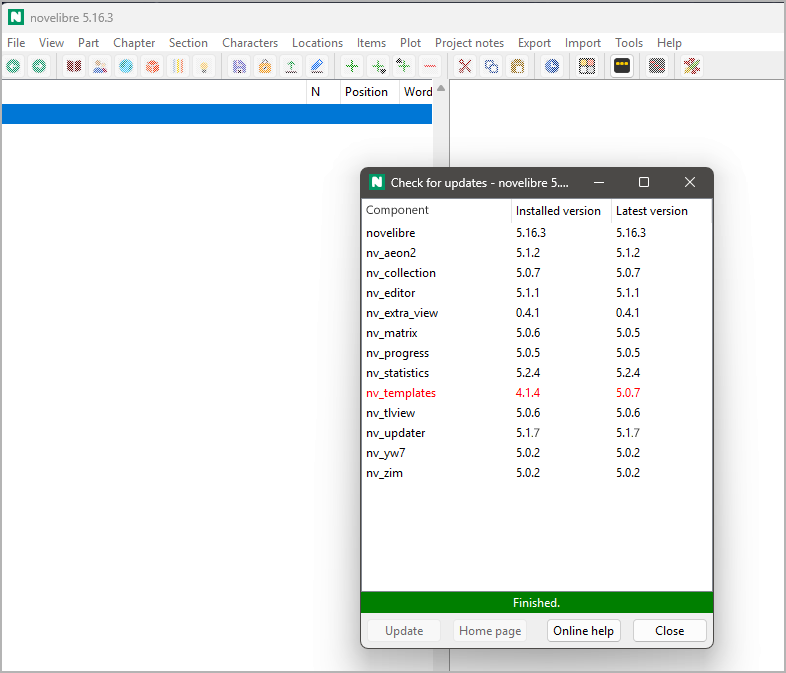
Open the update checker from the main menu: ${Tools} > ${Check for updates}.
A list pops up, showing installed software components and their version information. Outdated list entries are colored red.
Hint
If no connection to the repository can be established, the current version is indicated as “unknown”.
Buttons below the component list
${Update} (or double-click on a list entry)
starts your web browser with the download URL of the selected software component, if the installed version doesn’t match the latest version. After giving this command, the list entry is colored blue.
Important
The nv_updater plugin only initiates the download process via the system web browser. If a download directory is preset, the installation files with the downloaded releases will end up there. You then perform the actual installation manually as usual.
${Home page}
starts your web browser with the home page of the selected software component. There you can see e.g. the changelog.
${Online help} (or F1)
starts your web browser with this page of the user guide.
${Close}
Closes the update manager window and stops pending version checks.
Important
To take effect, update installations require a novelibre restart.
Copyright (c) 2025 by Peter Triesberger. All rights reserved.